🛠️ Working with the A1
This page is the hub for hands-on work with our lab’s A1: networking, onboard compute, SDK/ROS stack, and low-level control.
🧠 Onboard Compute & 🔌 Networking
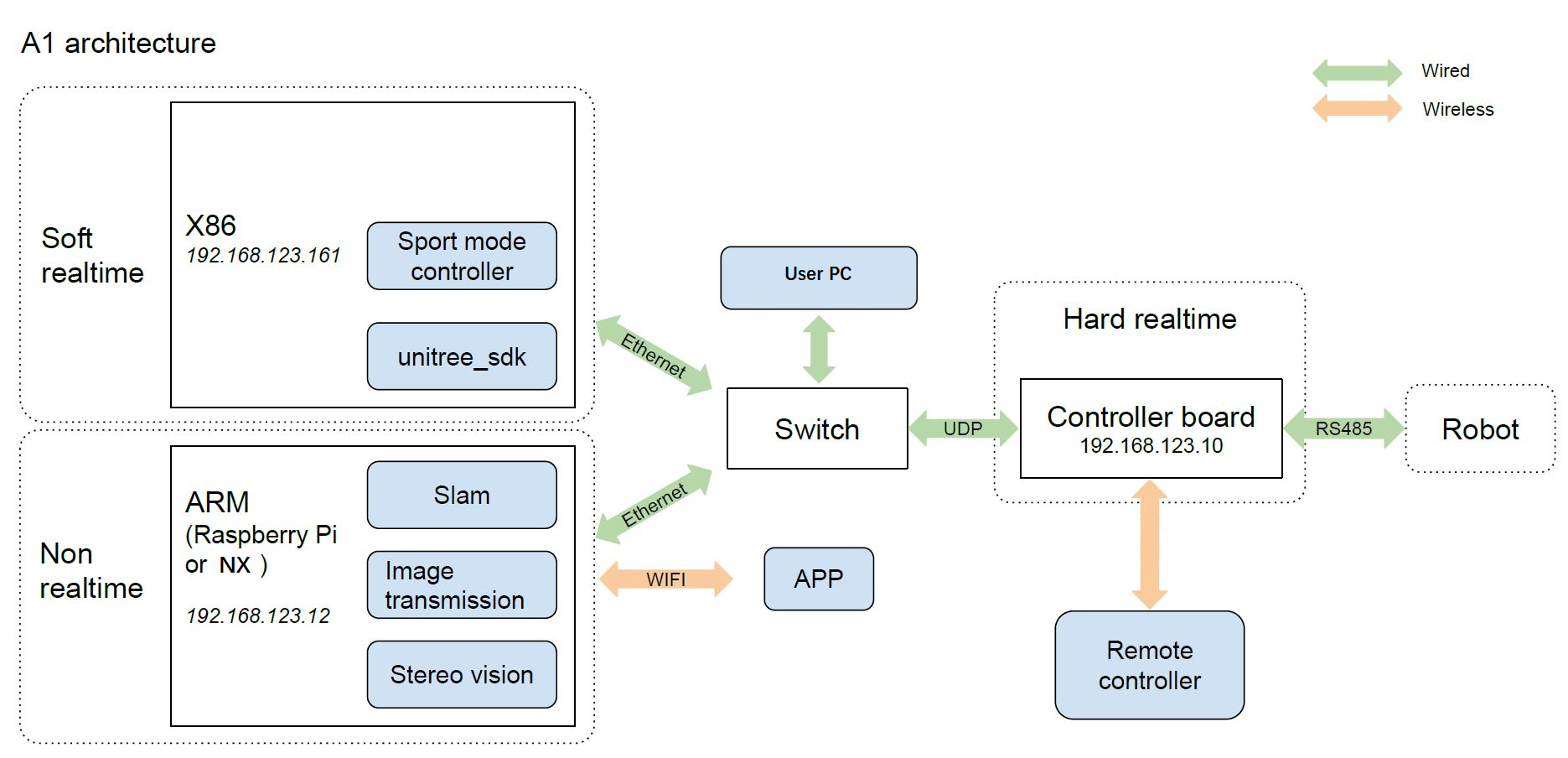
This robot has three computing elements:
- Controller Board — hard real-time motor control (
192.168.123.10). - NVIDIA Jetson (on-board PC) — vision/ML/SLAM (
192.168.123.161). Front body ports (towards head) map to the Jetson. - Raspberry Pi (on-board PC) — utilities/bridges/logging (
192.168.123.12). Rear body ports (towards tail) map to the Pi.
Architecture diagram - source
🔗 Network Topology
- Subnet:
192.168.123.0/24(static IPs)- Controller:
192.168.123.10 - Jetson:
192.168.123.161 - Raspberry Pi:
192.168.123.12
- Controller:
- An internal switch links controller ↔ Jetson ↔ Pi. Connect your laptop by Ethernet to join the LAN.
💻 Quick Connect from Laptop
- Set a static IP on your Ethernet interface in
192.168.123.0/24.sudo ip addr add 192.168.123.200/24 dev eth0
sudo ip link set eth0 up - SSH (with X forwarding):
Default password (both): 123.
# NVIDIA Jetson (front ports)
ssh -X unitree@192.168.123.161
# Raspberry Pi (rear ports)
ssh -X unitree@192.168.123.12
⚙️ Unitree Legged SDK — Joint-Level Control (UDP)
The Unitree Legged SDK communicates directly with the controller board over UDP to issue joint-level commands.
Use the specific release here: unitree_legged_sdk v3.2.
Install and quick test
- Install the SDK on an external machine (for example, your laptop). Do not install or run it on the onboard PCs.
- Connect your machine to the robot network: either SSH into any onboard machine or plug an Ethernet cable into either of the two external Ethernet ports on the robot body.
- Build and run the example commands according to the repository README to verify communication.
- For a minimal check, run an example such as:
This briefly sends a command to a single leg joint.
./example torque
warning
Safety first: The robot can move suddenly and erratically when running SDK examples. Hoist the robot with a tether and keep clear of the legs.
Note: When deploying a high-frequency controller using this SDK (for example, a control policy), prefer a wired connection for stability.
ROS interface
For a ROS interface to this SDK, use unitree_ros_to_real.
🧩 Useful Open-Source Projects
Gazebo simulation + ROS interface
- a1_sim_py — Simulate the A1 in Gazebo with a ROS interface.
Link: https://github.com/lnotspotl/a1_sim_py/tree/a3a65384d88414ab30a155c8baa71f1106c3d436
RL training in Raisim
- rl_locomotion — Train control policies for quadruped locomotion using reinforcement learning in the Raisim simulator.
Link: https://github.com/antonilo/rl_locomotion?tab=readme-ov-file
Hardware deployment with SDK integration
- vision_locomotion — Deploy trained policies on the real robot, with integration to the Unitree SDK.
Link: https://github.com/antonilo/vision_locomotion/tree/master
